Article List
Advertisement
Passport Parking Payments All Guides
Passport Parking
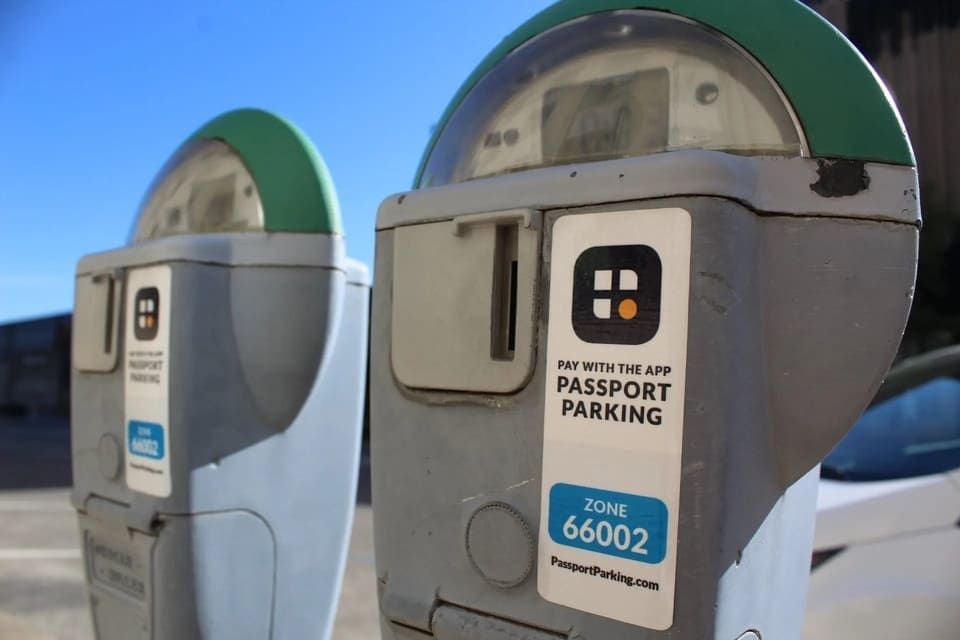
Passport Parking is an app mainly for paying your parking fees, so, knowing the details about its payments is of great importance. Here, let us figure out how to pay by Passport Parking and more.Where do I find the zone number?The zone number is a unique code that identifies your specific parking location (street, lot, or garage) and is required to start a session; you find it on posted signs or meter decals in the area you're parked in, and entering the wrong one can lead to a ticket. How am I charged?The app will debit your selected payment method for the exact amount of parking you purchased plus a small convenience fee (usually about a dime to thirty-five cents or more per session). You will instantly receive an e-receipt by email, and inside the app under "History" monthly statements are available also. What if I enter the wrong license plate?Go to the open session, press "Edit Plate," correct characters, then click save. Some municipalities permit plate edits only during initial minutes; if the option is grayed out, cancel the session, start a new one with the proper license plate and e-mail customer support to get a refund for the first purchase. Do I still need to display a paper receipt?In most Passport Parking locations enforcement officers electronically check your license plate for payment. Unless specifically stated on a nearby sign (eg, "Receipt Must Be Displayed"), you may store the digital confirmation in your phone and skip paper on the dashboard. Can I stop a session early and get a refund?In many cities there is "pro-rated" or "pay as you leave" pricing: when you pull out, slide the "Stop" button and any whole unused increments will be returned to your wallet in less than a day. In certain areas with local rules requiring a fixed minimum, refunds are not possible; the app will give you a warning before you click "confirm." How do I add a second vehicle?Go into "Vehicles," click on "Add a Vehicle", entering the license plate and state, giving it a name, for example "My Dad’s Ferrari". You can keep as many cars as you want, but only use one active session per zone at a time. Will this app work underground or in garages with no signal?If you're in a situation where you don't have any signals, the transaction info gets into a holding pattern to be uploaded as soon as you regain connectivity above ground. How do I dispute a ticket if the officer claims I didn't pay?Inside "History," select the session and tap "Share" to e-mail yourself a time-stamped PDF of it. Get that evidence, along with any shots taken of the zone sticker, into the city's parking appeals office by its deadline. Passport Parking's support team will be able to confirm your log on the back-end. Can I use Passport Parking when I travel to another city?Of course. Your account is global; just swap out the zone number for wherever you are. Rates, time limits and local rules are all updated automatically via GPS. What if I get a new phone number?Sign in with your old number, go to "Profile", "Phone," input the new number, input the SMS code, set as primary. All your history, wallet balance, and saved license plates transfer seamlessly. How do corporate or fleet accounts work?As for how to operate a corporate registration, organizations can open a Passport Parking Business portal, load funds in bulk, assign role-based access of driving behavior and download itemized dirigible GPS logs for each driver.Generally speaking, Passport Parking paying methods are quite easy and convenient, through the details above, you can quickly learn how to pay by Passport Parking.
Never Miss a Meter: Your Guide to Passport Parking Reminders
Passport Parking
Parking fee is a modern urban nightmare. It's soul-destroying when you return to your car and not only find the wretched ticket under your windscreen wiper, but your heart drops right off the bottom of your ribcage. However, with a mobile parking app such as Passport Parking, this common headache is easily taken care of in just one simple step: the parking session reminder.What is a Passport Parking reminder and how does it work?A Passport Parking reminder is a customizable alert system built into the app. When you start a parking session, you have the option to select from multiple predefined time periods and then set an alert that will warn you when your purchased time is almost up. It is rather like a digital alarm clock made solely for warning about parking expiry. Setting a reminder does not extend your time: all that you are doing is giving yourself some time to be proactive. How do I add a reminder for my parking session?After you enter your zone or space number and choose the desired amount of time for your parking stay, look for a reminder feature. You can select “alert me” or words to that effect from within the menu before making payment should have a drop-down list showing how soon before expiration you wish to receive notification. Once this interval is chosen, carry on your session as usual. The reminder will be now on. What are some good rules of thumb for reminders in terms of timing?The right reminder time depends on your situation. A 15 minute or 20 minute warning would generally be very appropriate. This gives you plenty of time to gather up your meeting materials, to belt your shopping bag up and walk back to your car casually and without stress in stead of racing. But if you're parked at a hard law enforcement installation, or with steep time limits, then make maximum reminder 30 minutes. This gives you a buffer if you need to return the hard way, from the body; or alternatively, even if you're just extending online, a buffer for troubleshooting. Can I extend my parking time from the reminder notice?Yes, this is one of the finest points about it. The push notification you get will normally contain either a direct link to or clear call to action (such as "Add More Time"). When you tap it you typically find that Passport Parking careers directly to the extension screen for your active session, with the zone number pre-populated. From this point onwards, all you need to do is quickly select how many minutes more it involves and approve payment. What if there is no reminder, or my phone is silent?Absolutely consider it your main and convenient guarantee, but be conscious of your parking deadlines as well. Make sure you've got notifications for the Passport Parking turned on in the settings on your phone. Even if your phone is on silent, the pop-up for that push notice may still appear on your lock screen. Just be sure to check it occasionally. Having a backup of an alarm set on your phone's clock app is invaluable. Is there a fee for using the reminder service?You won't be charged anything for setting a reminder in Passport Parking. The only costs come when you actually buy parking time, add extra minutes later, or do anything else that extends your parking duration. There is no additional service payment or subscription fee to make use of the Alert function. It is just an added convenience for customers and designed to help you better manage your parking experience, as well as to assist in complying with rules. Who benefits most from using parking reminders?Virtually, every user does, but there are certain groups which benefit in particular: Visitors unfamiliar with local enforcement intensity; Parents or caregivers distracted while their children are hanging around; Professionals in back-to-back meetings; Anyone who is shopping around with unpredictable timings.Above mentioned information clearly shows every detail about your parking reminders. By using parking reminders, you will not have to worry about parking your car overtime anymore.
Answers to the Common Questions about Passport Parking History
Passport Parking
Passport Parking is a parking management system designed to help users pay digital lifelong parking with a change practices which see people installing, relying on and coming to grips with their own end-users tend to find that the process of accessing and managing their parking histories can be a real impediment to smooth experience. Here are answers to the most frequently asked questions about Passport Parking's parking history. Where exactly can I check my Parking History of Passport Parking?It is very easy. Log in to your Passport Parking account through the Passport Parking Mobile App or the official website and you will be able to see your full Parking History at a glance. On the app, go to your "My Account" section from the front page to get overview of recent parking while for complete history click "See All" in parking session tab; on the site, sign in with "Log In" button at upper right of your screen, and there you can watch it in detail in account dashboard. How do I get a receipt for a parking in the past?Receipts are generated directly from your parking session details. When you find the particular park session that you want to view in history, just click or tap that entry to see sort out some details. On the details page, there will be middle button "Generate Receipt." After clicking on this button, the system will generate a receipt for you. What information is contained inside the parking history?Each parking place on record will contain several details, including number of parking zone (in which one), vehicle plate number, time start and finish for the session transfer cost, any convenience charge per activity (it is usually around $0.25 - $0.45) plus your payment method. This information is very useful when reporting expenses or trying to resolve parking-related disputes. Why some recent parking session isn’t in my history?For a parking session to show up in the history after it is over, especially with online transactions, can take several hours. If 24 hours later the session is still missing, for example, begin by checking to make sure you were making use of the correct account (check your phone number or email linked to it). Can I revise errors in my parking history?If you find an error (such as a typo in your license plate or entering the wrong zone number), right away contact Passport Parking customer support. Give them your account information and date and time of when you had the parking session involved. The correct information is necessary for them to check the settings in their system. They will update your record once an error has been confirmed, but bear in mind that input errors made by the user, e.g., entering the wrong zone, may not receive refunds unless such actions brought about excessive charges. How long does Passport Parking normally keep parking history in my account?In general, Passport Parking keeps parking history in the account for at least 12 months from the time that a parking session took place. This period of time allows you to access historical data for tax filings, expense reports or other long-term requirements. For recordings older than one year, contact customer support to ask if there is an archive that you can use, since they might not be available on the standard account history. What should I do if my parking history shows a balance due or a double charge?For unpaid balances, first check if the charge is a late fee. If you think the balance is incorrect, or if you see a duplicated charge, contact customer support and send them a screenshot of the record as well as proof that you have made payment.As can be seen distinctly from what has been talked and discussed above, parking history is simple to find, control and operate. Next time if you can not find or have something confused about your parking history, do not forget to read this article.